

ByteLabs POS Desktop for Linux
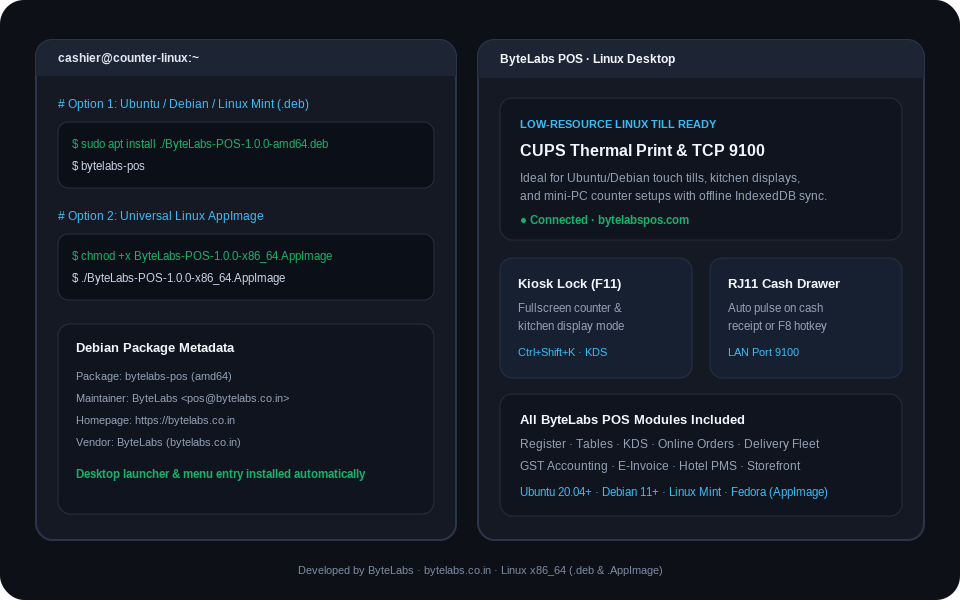
Deploy fast, low-overhead ByteLabs POS counters and kitchen display screens on Ubuntu, Debian, Linux Mint, or any x86_64 Linux workstation with native .deb APT integration, CUPS silent printing, and LAN TCP 9100 ESC/POS.
System requirements: Ubuntu 20.04+, Debian 11+, Linux Mint 21+, or any x86_64 distro (AppImage)
- Official AMD64 .deb package with desktop menu entry, icon, and Maintainer metadata
- Portable x86_64 .AppImage requiring zero installation on Fedora, Arch, or live systems
- Silent CUPS printing and direct LAN/Wi-Fi TCP 9100 raw ESC/POS + RJ11 cash drawer pulse
- Fullscreen Kiosk Lock (F11) and dedicated secondary-screen KDS / Customer Display
- Runs reliably on lightweight mini-PCs and touchscreen POS terminals with offline sync
Step-by-Step Setup Guide
How to install & configure Linux (.deb)
- 1
Download the .deb package (Ubuntu / Debian / Mint)
Download ByteLabs-POS-1.0.0-amd64.deb for Debian-based distributions, or grab the .AppImage for Fedora/Arch/other x86_64 distros.
- 2
Install the .deb package with apt
Open Terminal in your Downloads folder and run apt install so all shared desktop dependencies resolve automatically:
Terminal Commandsudo apt install ./ByteLabs-POS-1.0.0-amd64.debThen launch "ByteLabs POS" from your Applications menu or run `bytelabs-pos`.
- 3
Or run the portable .AppImage directly
If using the AppImage on any Linux distribution, mark it executable and launch:
Terminal Commandchmod +x ByteLabs-POS-1.0.0-x86_64.AppImage && ./ByteLabs-POS-1.0.0-x86_64.AppImage
Verify Download Integrity (SHA-256)
Every official ByteLabs installer includes a published SHA-256 checksum so you can confirm the file has not been modified in transit.
sha256sum "ByteLabs-POS-1.0.0-amd64.deb"Expected: 39da94c57a35f5e137dc843dcceaf8461ab3c53f4a44b83b77c89d518fbb8c82
Troubleshooting & FAQ
Should I choose .deb or .AppImage?
Use the .deb installer on Ubuntu, Debian, Linux Mint, Pop!_OS, or Zorin OS for automatic system menu integration. Use the .AppImage on Fedora, openSUSE, Arch, or read-only systems.
AppImage complains about FUSE on Ubuntu 22.04+ / 24.04+?
Install libfuse2t64 (sudo apt install libfuse2t64) or install the .deb package instead, which has zero FUSE requirement.
Need onboarding help? Contact [email protected] or visit bytelabs.co.in.