

ByteLabs POS Desktop for Windows
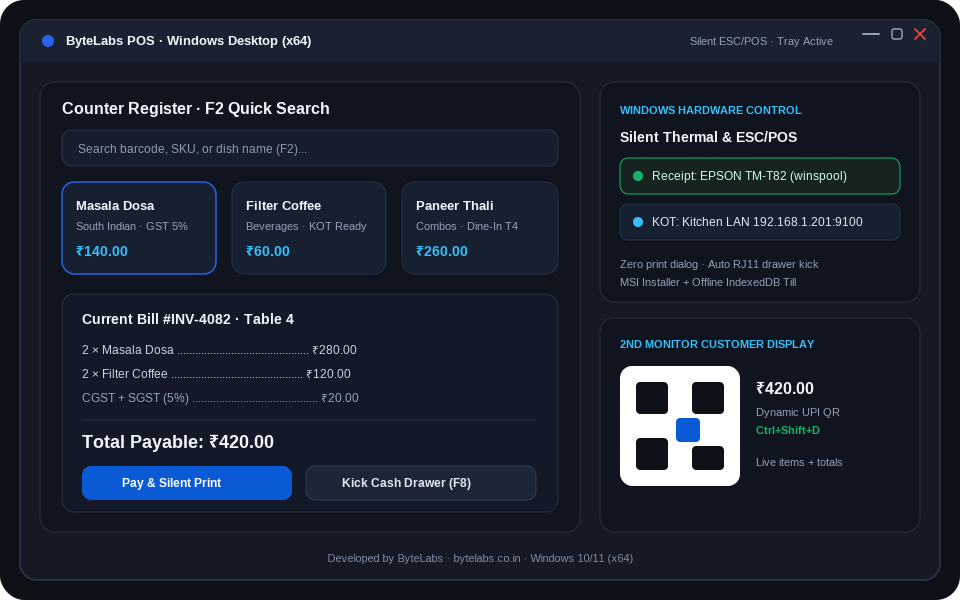
Built for Windows billing counters, hotel front desks, and kitchen monitors with silent 58mm/80mm/A4 printing, raw winspool.Drv ESC/POS, COM serial, LAN TCP 9100, and RJ11 cash drawer kick.
System requirements: Windows 10 / 11 (x64) · 4 GB RAM · 250 MB disk
- Official Windows Installer (.msi) with Start Menu & Desktop shortcuts plus Portable .zip
- Silent 58mm, 80mm, and A4 GST invoice printing with zero OS print dialog
- Direct ESC/POS over Windows Raw Spooler, LAN TCP 9100, and COM Serial + F8 cash drawer kick
- Dual-monitor Kitchen Display (Ctrl+Shift+K) and Customer Screen (Ctrl+Shift+D)
- Persistent IndexedDB offline till with automatic idempotent sync on reconnect
Step-by-Step Setup Guide
How to install & configure Windows
- 1
Download the Windows Installer (.msi)
Download ByteLabs-POS-1.0.0-x64.msi (recommended for all counter PCs) or the Portable ZIP if you do not have admin rights.
- 2
Run the installer wizard
Double-click the .msi file. If Windows Defender SmartScreen shows "More info", click "More info" → "Run anyway" to proceed with installation.
- 3
Sign in and map your printers
Launch ByteLabs POS from the Desktop shortcut, sign in to your workspace, and press Ctrl+, to assign your Receipt printer, KOT printer, and cash drawer.
Verify Download Integrity (SHA-256)
Every official ByteLabs installer includes a published SHA-256 checksum so you can confirm the file has not been modified in transit.
certutil -hashfile "ByteLabs-POS-1.0.0-x64.msi" SHA256Expected: d292e4f80d14e65877efdeb923cbf4c0e0f6aad62a1f0d5338444bb8b57e137e
Troubleshooting & FAQ
Windows SmartScreen says "Windows protected your PC"?
Click "More info" on the SmartScreen prompt and choose "Run anyway", or verify the file SHA-256 checksum on this page before installing.
How do I print without the Windows print dialog?
Press Ctrl+, inside the app, select "Windows Silent Print" or "Direct Raw ESC/POS via Windows Spooler", choose your thermal printer, and click Test Receipt Print.
Need onboarding help? Contact [email protected] or visit bytelabs.co.in.